
Step-by-Step Guide: How to Use a Mobile Ticket for Fast Colosseum Entry
If you have your Colosseum ticket on your phone, the last thing you want is to stand in the wrong line, struggle to open a PDF at the gate, or get delayed by a low battery. Many travelers book digital entry and assume it will be simple, but using a mobile ticket to enter the Colosseum fast works best when you know exactly what to do before you arrive.
This guide walks you through the process step by step, from finding the right ticket on your smartphone to joining the correct entrance line and avoiding common mistakes. You will also learn what to prepare in advance, what staff may check, and how to make your entry smoother on a busy day in Rome.
Key Takeaways
- You can usually use a Colosseum mobile ticket directly from your phone, but it is smart to download it in advance and keep a screenshot as backup.
- Fast entry depends on more than having a digital ticket; you also need the correct time slot, ID if required, and the right entrance queue.
- Battery life, mobile data issues, and unreadable screens are common reasons for delays at the gate.
- Arriving a little early helps you clear security and find the proper line without rushing.
- Official visitor information and ticket rules can change, so check the latest details before your visit.
What a mobile Colosseum ticket usually includes
What you receive after booking
After booking, most travelers receive a confirmation email with a PDF ticket, a booking code, or both. In many cases, that ticket can be shown directly on your phone without printing it.
Some providers also let you save the ticket to a mobile wallet, while others require you to open a PDF from your email. If you booked through a third-party seller, read the instructions carefully because the entry process may be slightly different from the official one.
What staff may check at the entrance
At the entrance, staff usually need to scan the barcode or QR code on your ticket. Depending on the ticket type, they may also check the name on the booking and ask for identification.
This matters because not every delay comes from the line itself. Sometimes visitors reach the front quickly but then need time to search for the correct email, zoom in on a cracked screen, or locate the name of the lead traveler.
Quick Tip: Open your ticket before you reach the gate and turn your screen brightness up. Scanners work better when the code is fully visible and not hidden inside an email thread.
How to prepare your phone before you arrive
Download everything in advance
Do not rely on mobile signal outside the Colosseum. Even if your connection normally works well, crowded tourist areas can be slow or unreliable.
Before leaving your hotel or apartment, download the ticket PDF to your phone. It also helps to take a screenshot of the barcode page and save the confirmation email offline if your email app allows it.
Charge your battery and bring a backup option
A mobile ticket is only fast if your phone is working. If your battery is already low after a morning of maps, photos, and messaging, you may end up searching for a charger instead of entering the monument.
Charge your phone fully before heading out. If possible, carry a small power bank and charging cable.
Check names, date, and time slot
Many Colosseum tickets are timed, which means you must arrive for a specific entry window. Make sure the date and hour on your ticket match your plan for the day.
Also check the names on the booking if your ticket is nominative. The official visitor information from the Parco archeologico del Colosseo is the best place to confirm current ticket and entry rules: Opening Times and tickets – Parco archeologico del Colosseo.
Step-by-step: how to use a mobile ticket to enter the Colosseum fast
1. Arrive early, but not excessively early
Plan to arrive around 15 to 30 minutes before your booked time unless your ticket provider gives different instructions. This gives you enough time to find the right entrance area and pass security without adding unnecessary waiting.
Arriving too late is the bigger problem. A timed ticket helps with flow, but it does not guarantee stress-free entry if you are still looking for the gate at your scheduled time.
2. Go to the correct entrance line
The Colosseum often has separate queues for different ticket types, guided visits, and on-site assistance. Having a mobile ticket does not always mean you can walk into any line marked “tickets.”
Look for signs related to pre-booked or reserved entry, and check your booking email for any meeting-point instructions. If you booked a hosted entry or tour, the meeting point may be outside the main entrance area.
3. Have your ticket open before you reach staff
When you are a few minutes away from the scanner, unlock your phone and open the exact ticket page. Avoid handing staff a phone that is still searching for signal or switching between tabs.
If you are traveling as a group, it is often easiest for one person to keep all tickets ready in order. Scroll through them one by one so each code can be scanned quickly.
4. Keep your screen clear and readable
Turn up brightness and disable any blue-light filter if it makes the barcode harder to read. If your screen is cracked, try using the PDF version instead of a screenshot if the code is more visible there.
Do not zoom in too tightly unless necessary. The full code and surrounding area are often easier for scanners to read when shown at normal size.
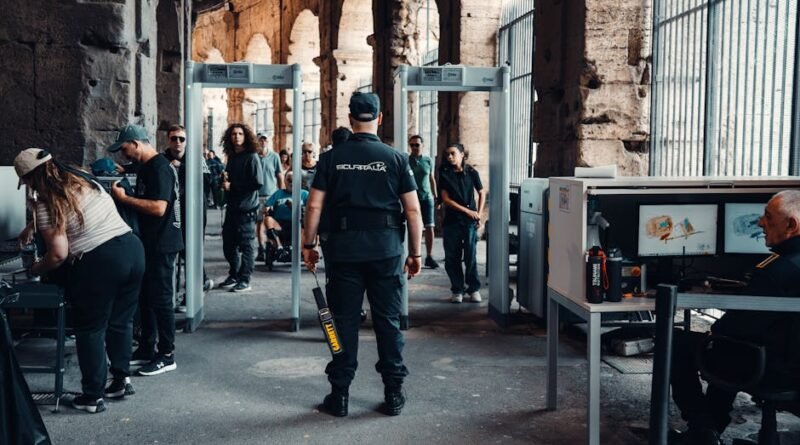
5. Pass security and keep moving
Even with fast or pre-booked entry, you still may need to go through a security check. Bags, metal items, and prohibited objects can slow this part down.
Keep your belongings organized and avoid carrying unnecessary items. Once your ticket is scanned, follow staff directions promptly so the line behind you keeps moving.
Common problems that slow down entry
Email search panic at the gate
One of the most common mistakes is waiting until the last second to find the booking email. Travel inboxes fill up quickly with flight updates, hotel confirmations, and attraction tickets.
Flag the email, move it to a travel folder, or save the file with a clear name such as “Colosseum ticket.” That small step can save several minutes at the entrance.
Using the wrong document
Some travelers try to show a payment receipt instead of the actual entry ticket. Others open the booking page but not the scannable code.
Before you leave, confirm which file contains the barcode or QR code. If your provider sends multiple emails, identify the one that staff actually need to scan.
Low battery or locked screen
Face ID, passcodes, and battery-saving mode can all become annoying when you are moving through a queue. Make sure you can unlock your phone quickly and keep it awake long enough for scanning.
If you are traveling with another person, consider sharing the ticket file with them as a backup.
Name or ID mismatch
If your ticket includes a traveler name, the details should match your identification. This is especially important if only one person in the group made the booking for everyone.
Bring the ID requested by your provider and keep it easy to access. A mobile ticket alone may not be enough in every case.
Mobile ticket vs printed ticket: which is better?
For most travelers, a mobile ticket is the easier option because it reduces paper, is simpler to store, and is always with you on your phone. Still, a printed copy can be useful if you worry about battery life or screen damage.
| Option | Best for | Main drawback |
|---|---|---|
| Mobile ticket | Travelers who want convenience and less paper | Depends on battery, screen, and file access |
| Printed ticket | Travelers who want a physical backup | Can be lost, folded, or forgotten |
| Both mobile and printed | Travelers who want the safest backup plan | Requires a little more preparation |
If printing is easy for you, carrying both versions is a practical middle ground. But if you only use your phone, proper preparation usually matters more than printing.
How to make your Colosseum visit smoother after entry
Know what your ticket also covers
Many Colosseum tickets include access to related archaeological areas, but the exact terms vary by ticket type. Read the inclusions carefully so you know whether your pass covers only the Colosseum or also other nearby sites.
A helpful overview of common ticket types and practical booking advice can be found here: Colosseum Ticket Types Explained.
Use an official planning source before your visit
Opening times, access rules, and app-based visitor tools can change. The official Colosseum Archaeological Park page is the best first stop for up-to-date visitor information, while additional planning guides can help with transport and timing.
If you want a broader practical overview of visiting logistics, this guide may help: How To Visit the Colosseum in 2026: Tickets, Hours & More.
Keep your phone ready inside
You may need your phone again if your booking includes multiple access points, audio features, or saved documents for the rest of your day. Keep enough battery for maps, return transport, and any additional ticket checks.
Quick Tip: Put your ticket, passport copy if appropriate, and key travel confirmations in one album or folder on your phone. It makes busy sightseeing days much easier.
Best practices for travelers using smartphones for tickets
Use a simple backup system
The fastest travelers usually do not rely on just one method. A good setup is:
- ticket PDF downloaded to the phone
- screenshot of the scannable code
- email saved and easy to find
- shared copy with a travel companion if possible
This takes only a few minutes and reduces the chance of getting stuck at the entrance.
Prepare for international travel conditions
If you are visiting from abroad, your data plan may not work as expected. Roaming issues, app logouts, and weak signal are all common travel problems.
That is why offline access matters so much when using a mobile ticket to enter the Colosseum fast. Treat your phone ticket like a boarding pass: ready before you need it, not when you are already at the scanner.
Frequently Asked Questions
Can I enter the Colosseum with a ticket on my phone?
In many cases, yes. Travelers often use a PDF or scannable mobile ticket directly from a smartphone, but you should always follow the instructions from your ticket provider and check whether ID is also required.
Do I need to print my Colosseum ticket?
Usually not, if the ticket provider accepts mobile entry. Still, printing a backup can be helpful if you are worried about battery life, poor connectivity, or screen damage.
How early should I arrive for a timed Colosseum entry?
Arriving around 15 to 30 minutes early is usually a practical target. It gives you time to find the correct line and clear security without waiting too long.
What should I do if my mobile ticket will not load at the entrance?
Use a downloaded PDF or screenshot if you have one. If not, step aside from the line, connect if possible, search for the confirmation email, and have your booking reference and ID ready in case staff need to verify the reservation.